What Is a Mesh Wi-Fi Network?
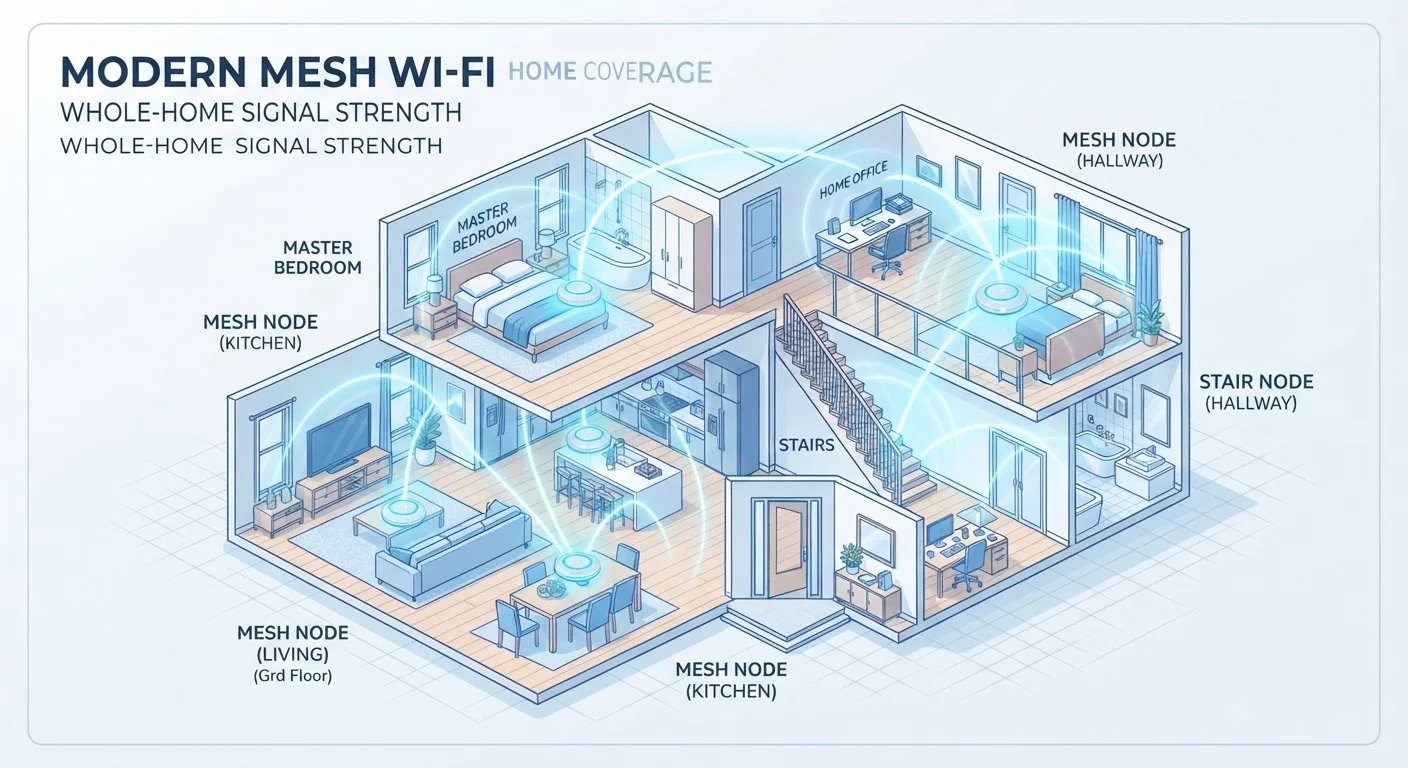
A mesh Wi-Fi network is a system of two or more wireless access points - called nodes - that work together to blanket your entire home in a single, seamless Wi-Fi signal. Unlike a traditional setup where one router handles everything from a single location, a mesh system distributes the wireless workload across multiple hardware units placed throughout your home.
From your phone or laptop's perspective, there is only one network. You see one network name (SSID) and one password. The intelligence lives inside the system itself, which quietly decides which node should serve your device at any given moment based on signal strength and network load.
Node
An individual hardware unit in a mesh network. Each node is a wireless access point that communicates with other nodes and with your devices.
SSID
Short for Service Set Identifier - the name of a Wi-Fi network that appears when you search for available connections on your device.
Backhaul
The dedicated communication link between mesh nodes themselves, separate from the connection your devices use. It carries data from satellite nodes back to the primary node connected to your modem.
Seamless handoff
The automatic process by which a mesh system transfers your device's connection from one node to a nearer, stronger node as you move through the home - without you needing to reconnect.
Frequency band
The radio frequency range a Wi-Fi signal uses. Common bands are 2.4 GHz (longer range, lower speed) and 5 GHz (shorter range, higher speed). Wi-Fi 6E adds a 6 GHz band.
Ethernet backhaul
A setup where mesh nodes are connected to each other using physical network cables rather than a wireless signal, providing the most stable and fastest inter-node communication.
If you've ever struggled with Wi-Fi dead zones in a far bedroom, a basement, or a backyard, the root cause is almost always distance and physical obstacles - walls, floors, and large appliances all absorb and scatter radio signals. Mesh networks solve this by eliminating the single point of coverage and replacing it with a cooperative web of nodes. For a broader glossary of networking and smart home terms, the smart home terminology guide is a useful companion read.
How Mesh Nodes Route Your Signal
Each mesh node contains a wireless radio - usually supporting both the 2.4 GHz and 5 GHz frequency bands. When your device connects to the network, it associates with whichever node is geographically closest and broadcasting the strongest signal.
As you move through your home - say, walking from the kitchen toward the garage - the mesh system monitors your device's signal quality in real time. When your signal to the current node degrades past a threshold, the system triggers a seamless handoff, transferring your connection to the next nearest node. This happens in milliseconds, invisibly, without you reconnecting manually.
Data traveling from your device ultimately needs to reach the primary node, which is physically connected to your modem and the broader internet. Nodes relay that data hop-by-hop through the mesh until it exits to the internet - or arrives inbound from the internet to your device. Modern mesh systems use sophisticated algorithms to determine the most efficient path for each data packet, dynamically rerouting if one node becomes congested or experiences interference.
Place Nodes for Overlap, Not Just Coverage
For best results, position mesh nodes so their coverage areas overlap slightly rather than placing them at the absolute edge of each other's range. An overlapping placement ensures a device always has a strong signal before the handoff is triggered, preventing brief gaps during the transition. As a practical rule of thumb, if you can still see two or three bars of signal from the previous node when you're standing next to the new one, placement is likely close to optimal.
Backhaul: The Hidden Backbone of Mesh Systems
Backhaul is the communication link between mesh nodes themselves - distinct from the link between a node and your devices. Understanding backhaul is the key to understanding why some mesh systems perform significantly better than others.
In a wireless backhaul setup, nodes use one of the Wi-Fi bands to talk to each other. In lower-cost systems, backhaul and device traffic share the same radio band. This creates competition: bandwidth your phone uses for Netflix is the same bandwidth a node uses to relay data to the primary node, cutting effective speeds.
Higher-performing systems use a dedicated backhaul - either a separate radio band (often a second 5 GHz radio or a 6 GHz band in Wi-Fi 6E systems) reserved exclusively for inter-node communication, or an Ethernet backhaul where nodes are connected by a physical network cable. Ethernet backhaul eliminates wireless interference entirely and is widely considered the most reliable option for demanding households.
Understanding backhaul also matters for smart home ecosystems. Because mesh systems create a stable, low-latency backbone, smart devices throughout the home maintain more reliable connections - a factor explored further in our article on why smart home devices lose connectivity.
Mesh vs. Traditional Router and Range Extender Setups
A traditional single router radiates signal from one fixed point. Performance degrades predictably with distance and wall penetration. For homes under roughly 1,200 square feet with an open floor plan, a single capable router is often sufficient.
A range extender (also called a Wi-Fi booster or repeater) amplifies the existing signal and rebroadcasts it. The catch: it typically creates a separate network with a different name, requiring you to manually switch connections as you move around. More critically, because it rebroadcasts on the same channel it receives on, it effectively halves the available bandwidth at each hop.
A mesh system avoids both limitations. Every node shares the same network name, enabling automatic device roaming. The dedicated backhaul (in better systems) means nodes communicate efficiently without cannibalizing the bandwidth your devices use. The trade-off is cost - mesh kits are generally more expensive than a single router or a simple extender.
For context on how these wireless standards fit into the broader connectivity picture - including how your devices balance Wi-Fi with cellular connections - the guide to 5G, LTE, and Wi-Fi calling explains how modern devices choose between network types.
Is a Mesh Network Right for Your Home?
Mesh networks are well-suited to specific situations: multi-story homes, properties with thick concrete or brick walls, homes over roughly 2,000 square feet, and households running many simultaneous wireless devices - smart speakers, cameras, thermostats, laptops, and streaming devices all competing for bandwidth.
If your home is small and your current router placement already delivers strong signal everywhere, a mesh upgrade may not produce a meaningful improvement. However, if you regularly experience dead zones, dropped video calls in certain rooms, or slow speeds on devices far from your router, a mesh system directly addresses those failure points.
Consider your backhaul options during setup. If your home has Ethernet cabling run between floors or rooms, wired backhaul will give you the most consistent performance. If not, a tri-band system with a dedicated wireless backhaul band is a practical alternative.
Mesh technology also pairs naturally with growing smart home ecosystems. As more devices come online - whether running newer protocols like Matter or legacy standards - a reliable, whole-home wireless foundation becomes increasingly important. Our overview of what the Matter standard changes for smart homes explores how wireless infrastructure interacts with emerging interoperability standards.