Why Laptop Specs Feel Like a Foreign Language
When you sit down to research a new laptop, the spec sheet hits you like a wall of acronyms: GHz, DDR5, NVMe, TDP. None of it sounds like it belongs in a conversation a normal person would have. But each term is answering a specific question about how the laptop will perform in your daily life - you just need a translator.
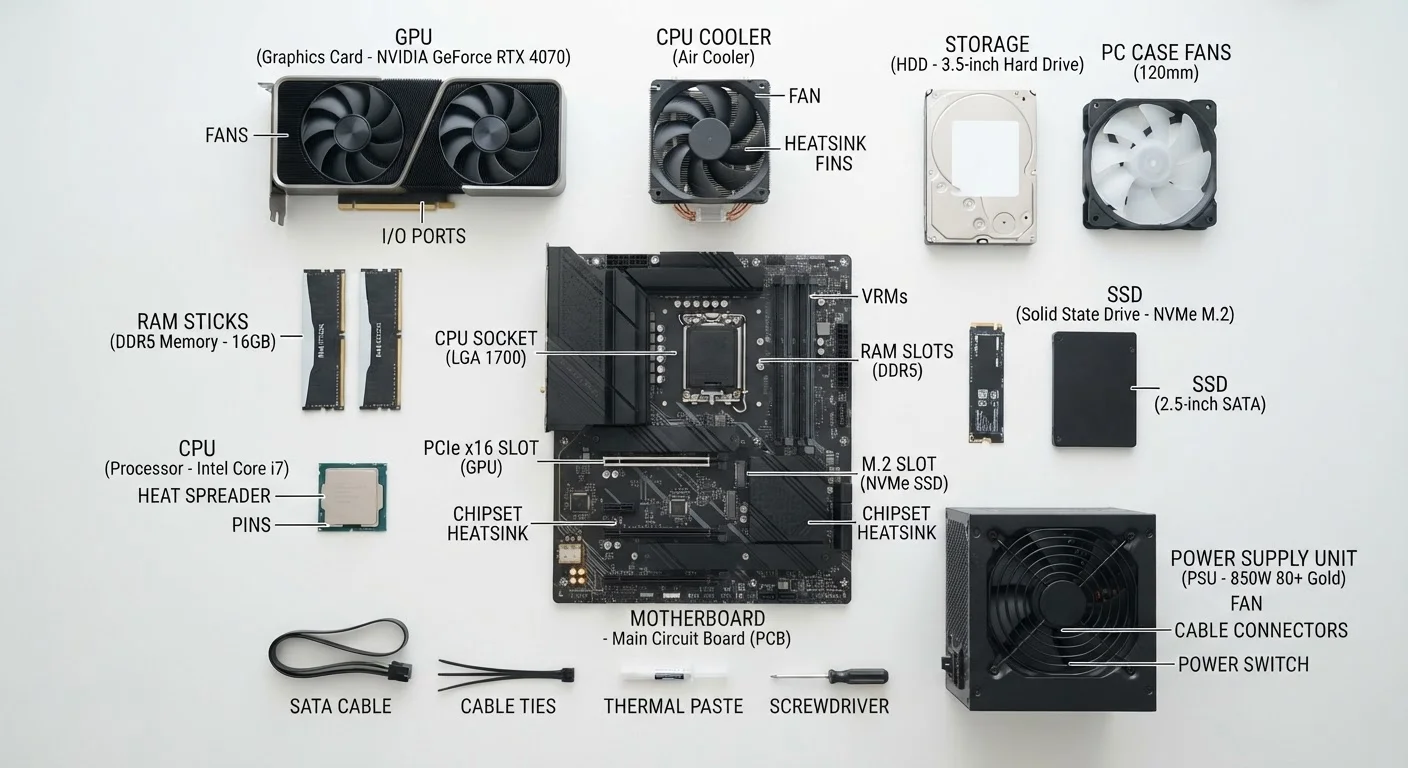
This glossary covers the terms you're most likely to encounter while shopping, organized by the component they describe. For a broader map of how all these parts work together, see our beginner's guide to PC components.
CPU
The Central Processing Unit - the main chip that executes instructions and runs your software. Think of it as the laptop's brain, handling everything from loading a web page to running a spreadsheet.
RAM
Random Access Memory - the laptop's short-term, high-speed workspace. It holds data your processor needs right now; more RAM lets you run more programs simultaneously without slowdowns.
NVMe
Non-Volatile Memory Express - a fast interface standard for SSDs. NVMe drives communicate with the CPU through a high-speed lane, delivering noticeably quicker boot times and file transfers than older SATA-based SSDs.
TDP
Thermal Design Power - measured in watts, TDP describes how much heat a processor generates under sustained load. It directly affects battery life, cooling requirements, and whether a laptop can maintain peak speed over time.
GHz
Gigahertz - a measure of a processor's clock speed, or how many cycles it completes per second. A higher GHz can mean faster single-task performance, but core count and chip architecture are equally important.
DDR5
Double Data Rate 5 - the current mainstream generation of RAM technology. Compared to DDR4, it offers faster data transfer speeds and improved power efficiency, though real-world differences in everyday tasks can be subtle.
SSD
Solid State Drive - a storage device that uses flash memory chips rather than spinning magnetic disks. SSDs are faster, quieter, and more shock-resistant than traditional hard drives.
GPU
Graphics Processing Unit - a specialized chip that handles image rendering and visual computation. Integrated GPUs share the CPU's resources; discrete GPUs have dedicated memory and are used in gaming and creative workloads.
Thunderbolt
A high-bandwidth port standard (developed by Intel) that can carry data, display output, and power over a single cable. Thunderbolt 4 supports speeds up to 40 Gbps and can drive multiple 4K monitors simultaneously.
Refresh Rate
Measured in hertz (Hz), this is how many times per second a display redraws the image. Higher refresh rates produce smoother-looking motion, which is especially noticeable in gaming and fast-scrolling content.
nits
The unit used to measure screen brightness. A higher nit value means the display is brighter and more readable in well-lit or outdoor environments; 250-300 nits is typical indoors.
Wi-Fi 6
The sixth generation of the Wi-Fi standard (also called 802.11ax). It offers faster maximum speeds and handles congested networks - like a home with many connected devices - more efficiently than previous generations.
Processor (CPU) Terms
The CPU (Central Processing Unit) is the laptop's primary engine - it runs your apps, handles your browser tabs, and orchestrates everything else. Here's what the numbers around it mean:
- GHz (Gigahertz): Clock speed - how many processing cycles the chip completes per second. Higher isn't always faster; architecture and core count matter equally.
- Cores & Threads: Cores are independent processing units within the chip. Threads are virtual lanes each core can run simultaneously. More cores help with tasks like video editing; everyday web browsing rarely needs more than four.
- TDP (Thermal Design Power): Measured in watts, TDP indicates how much heat the processor generates under load. A lower TDP generally means longer battery life and a thinner chassis - but sometimes at the cost of sustained performance. This is closely related to the concept of thermal throttling, where a laptop deliberately slows its processor to avoid overheating.
- Integrated vs. Discrete Graphics: An integrated GPU shares resources with the CPU; a discrete GPU has its own dedicated processor and memory. Discrete graphics matter for gaming and video work.
Memory (RAM) Terms
RAM (Random Access Memory) is the laptop's short-term workspace - it holds everything you're actively using so the processor can reach it instantly. When you see RAM specs, you'll encounter:
- GB (Gigabytes): The capacity of RAM. More GB means you can keep more apps and browser tabs open without slowdown. For general use, 8 GB is a baseline; 16 GB or more is comfortable for multitasking.
- DDR4 / DDR5: The generation standard of the RAM. DDR5 is newer, offering faster data transfer and better efficiency than DDR4. The number tells you the technology, not the quantity.
- MHz / MT/s: RAM speed, expressed in megahertz or megatransfers per second. Higher speeds allow faster data exchange between RAM and the CPU, though real-world gains are often modest for everyday tasks.
- Soldered vs. Upgradeable: Many thin laptops solder RAM directly to the motherboard, meaning you can't add more later. If upgradeability matters to you, confirm this before buying.
For a deeper look at how RAM capacity affects real-world performance, see our companion piece on what RAM numbers actually mean.
Storage Terms
Storage holds your files, your operating system, and your apps long-term - even when the laptop is off. The spec sheet will use several terms here:
- SSD vs. HDD: A Solid State Drive (SSD) stores data on flash chips with no moving parts - much faster and more durable than a traditional Hard Disk Drive (HDD), which uses spinning magnetic platters. Most modern laptops ship with SSDs.
- NVMe vs. SATA: These are interface standards that determine how the SSD connects to the rest of the system. NVMe (Non-Volatile Memory Express) uses a faster pathway than SATA, resulting in significantly quicker file transfers and boot times.
- TB / GB (storage capacity): Terabytes and gigabytes measure how much data the drive can hold. A typical user with documents, photos, and a few applications often fits comfortably within 256 GB to 512 GB, though video editors and gamers may need 1 TB or more.
If you're curious how laptop storage choices compare to desktop configurations, our article on desktop vs. laptop performance trade-offs covers those differences in detail.
Display and Connectivity Terms
The display spec tells you how sharp and smooth the screen will look; connectivity specs tell you what you can plug in.
- Resolution (e.g., 1920×1080 / FHD, 2560×1600 / QHD): The number of pixels on screen. More pixels mean a sharper image. Full HD (1080p) is standard; higher resolutions matter more on larger screens or for detail-intensive work.
- Refresh Rate (Hz): How many times per second the display updates. 60 Hz is standard for general use; 120 Hz or higher delivers noticeably smoother motion for gaming or video.
- nits (brightness): A unit measuring screen brightness. Laptops used primarily outdoors benefit from 400 nits or more.
- Thunderbolt / USB4: High-speed port standards that carry data, video, and power over a single cable. Thunderbolt 4 and USB4 are currently the most capable options for connecting external monitors, storage, or docks.
- Wi-Fi 6 / Wi-Fi 6E: The current generation of wireless networking standards. Wi-Fi 6 offers faster speeds and better performance in crowded environments compared to older Wi-Fi 5.
Shoppers who are also evaluating their smartphone's spec sheet will find similar display and connectivity terminology explored in our field guide to smartphone specs.