The Microphone Array: More Than Just One Ear
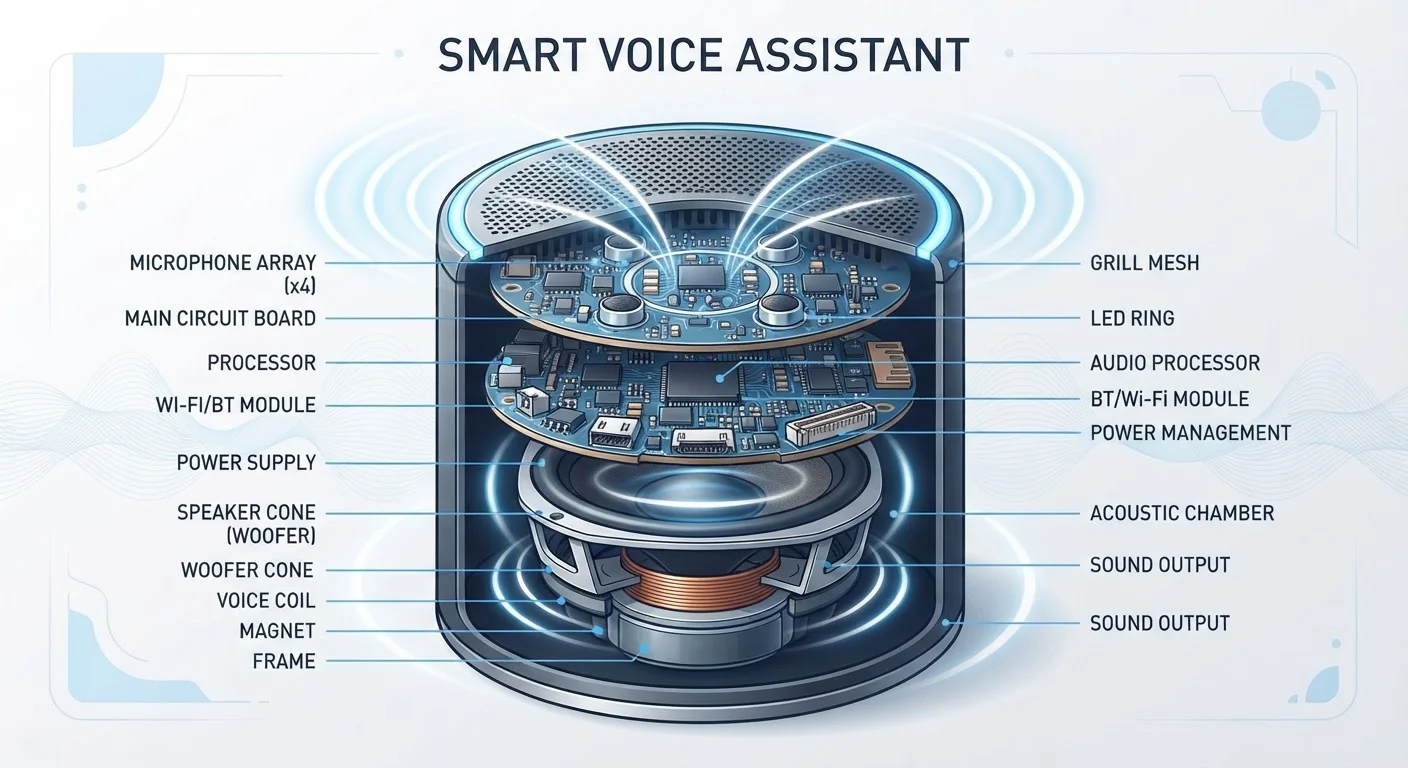
Open up most smart speakers and you won't find a single microphone - you'll find a ring or grid of them, typically between four and seven. This arrangement, called a microphone array, is what separates a smart speaker from a basic Bluetooth speaker with a mic tacked on.
Each microphone in the array captures sound at a slightly different moment in time, because sound waves travel at a fixed speed. A technique called beamforming uses those tiny timing differences to calculate the direction your voice is coming from, then mathematically amplifies audio from that direction while suppressing everything else. The result: the device can pull your voice out of a room where the TV is on and someone is running the dishwasher.
For a deeper look at how speaker hardware handles directional audio, the concepts behind spatial sound processing share some of the same directional audio principles.
4-7
Microphones in a typical smart speaker array
Most mainstream smart speakers ship with between four and seven microphones arranged to enable beamforming and noise cancellation.
<2 sec
Typical voice command round-trip time
On a stable broadband connection, most voice assistants return a spoken response within two seconds of the wake word being detected.
~1 mW
Power used during idle wake-word listening
DSP-based wake word detection is designed to consume only a small fraction of the device's total power, enabling always-on monitoring without significant energy cost.
Wake Word Detection: Always Listening, Not Always Recording
The distinction between "always listening" and "always recording" is critical - and widely misunderstood. Your smart speaker runs wake word detection on a dedicated low-power chip called a digital signal processor (DSP). This chip does one narrow job: match incoming audio against a stored acoustic model of the wake word. The main processor stays dormant, and no audio leaves the device.
When the DSP hears a close enough match to the wake word, it wakes the main processor and begins capturing audio to send to the cloud. A small LED indicator typically illuminates at this point, signaling that active listening has begun. If the device mishears a similar-sounding phrase - a common frustration - it's because the matching threshold is tuned to be sensitive enough to catch your real command across a room.
Understanding terms like "local processing" and "latency" is useful here - the smart home glossary covers both in plain language.
From Your Voice to the Cloud: The Processing Pipeline
Once triggered, the captured audio clip travels over your home Wi-Fi to the manufacturer's servers. There, two things happen in rapid sequence:
- Automatic Speech Recognition (ASR) converts the raw audio waveform into text - transcribing what you actually said.
- Natural Language Processing (NLP) interprets the text to identify your intent (what you want done), relevant entities ("timer," "ten minutes," "kitchen"), and any required actions.
The server then executes the action - querying a weather database, sending a command to a smart bulb, streaming a song - and sends a spoken response back to your speaker, where a small built-in amplifier and driver cone deliver it as audio. The whole round-trip typically completes in under two seconds on a reliable broadband connection.
Because this pipeline depends heavily on your home network, connectivity hiccups directly affect response quality. That's one reason smart home devices sometimes stop cooperating - the Wi-Fi layer is a shared dependency across all of them.
“The challenge in voice interface design isn't just hearing speech accurately - it's understanding what a person actually means, across every accent, phrasing, and context imaginable. That's a fundamentally different problem from transcription.”
— A senior researcher in conversational AI, Natural language processing researcher, cited in industry literature on voice interface design
How It Compares to Other Device Architectures
The hardware inside a smart speaker is purpose-built in a way that's worth contrasting with general-purpose devices. Your smartphone contains a similar microphone array and even dedicated wake word hardware, but it also carries a display, camera system, cellular radio, and a far more powerful application processor - all of which demand significantly more battery and thermal management. For a detailed comparison, see our plain-English smartphone hardware tour.
A smart speaker trades that versatility for efficiency. Its processor only needs to handle audio - encoding, decoding, and playback - so manufacturers can use lower-power components and skip the battery entirely by keeping the device plugged in. The speaker driver itself is often a modest 1.5-inch to 3-inch unit, tuned for voice clarity rather than full-range music reproduction, which is why dedicated audio hardware like a soundbar produces noticeably richer sound.
Together, these design choices explain why smart speakers are inexpensive relative to their capabilities: the heavy computational lifting is offloaded to servers, and the physical hardware only needs to handle the front and back ends of the audio pipeline.